

Skip to content
VerifiX, secured by ITSEC

Platform · AML

Screening that explains why it matched.

Sanctions, PEP, watchlist, and adverse-media screening with fuzzy and transliteration-aware matching, ongoing rescreening, and match reasoning your reviewer can defend in a regulatory inspection.

Inside a match

What screening returns, and why

A hit is not a verdict. Every match arrives with the list, the matched fields, the score, and the reasoning an analyst can act on.

01

Sanctions and watchlists

Global and regional sanctions regimes plus law-enforcement and regulatory watchlists. Full list coverage: UN, UAE local, and major international sanctions and PEP sources, refreshed on the provider's publication cycle.

02

PEP and RCA

Politically exposed persons with relatives and close associates, tiered by seniority so a head of state and a local councillor are not treated identically.

03

Adverse media

Negative-news screening categorised by risk type, financial crime, fraud, terrorism, trafficking, with the source article retained.

04

Name matching

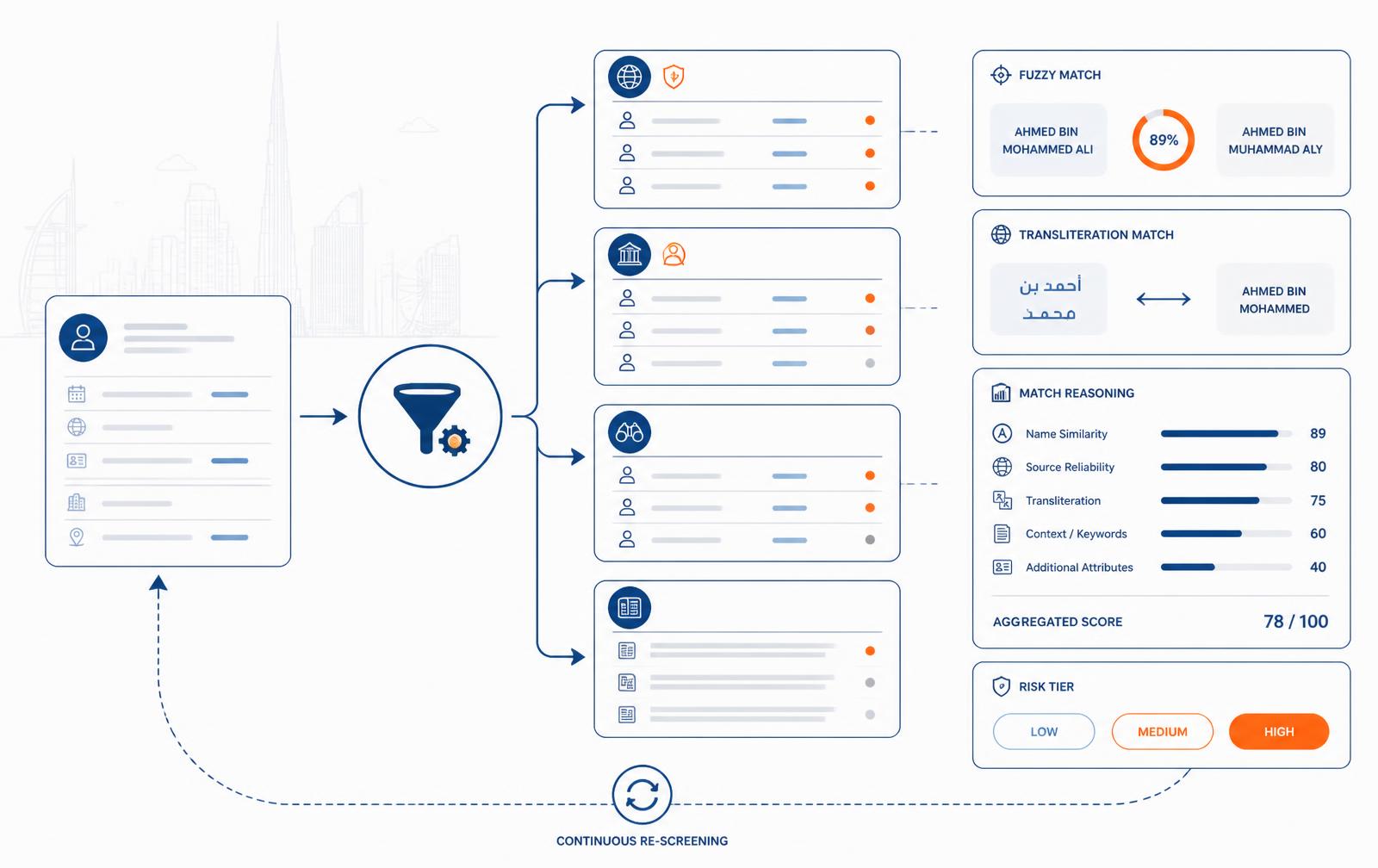
Phonetic, fuzzy, and Arabic transliteration handling, with configurable sensitivity so you can tune false positives per journey.

05

Match reasoning

Every hit shows which field matched, at what confidence, on which list, at which version, no unexplained black-box alerts.

06

Ongoing rescreening

Customers are rescreened as lists change; new hits open an alert on the existing case with a diff against the previous screening result.

Match to disposition

How a hit becomes a decision

Screen, score, review, dispose, and the disposition holds on the next screening run.

  1. 1

    Screen at onboarding

    Screening runs inside the KYC or KYB journey, so a hit blocks the decision instead of surfacing after approval.

  2. 2

    Triage alerts

    Alerts arrive in the queue ranked by score, with the matched record side by side against your customer data.

  3. 3

    Discount or escalate

    A reviewer discounts a false positive with a mandatory reason, or escalates for four-eyes sign-off and enhanced due diligence.

  4. 4

    Keep watching

    The customer stays under continuous rescreening, and every list change that touches them is recorded.

Screening result · 1 potential matchSample data

Potential PEP match, requires review

List category: domestic PEP · escalated to level 2 review

Name similarity92%
Date of birth100%
Nationality100%
Secondary identifiers41%
Lists searched
Sanctions, PEP, adverse media
Match decision
Escalate to analyst
Retained
Search snapshot + decision reason

Chain of custody

One match, from hit to disposition

Illustrative sample data. A discounted match does not resurface unresolved on the next run.

  1. 08:31:15Screening run · sanctions, PEP, adverse media
  2. 08:31:16Potential match · name 0.91, date of birth partial
  3. 08:31:16Case opened · routed to screening queue
  4. 09:47:52Analyst reviewed · requested source of funds
  5. 14:12:03Match discounted · different individual, reason recorded
  6. 14:12:03Disposition stored · suppressed on future runs

Named modules

The screening and monitoring checks

Onboarding screening and continuous re-screening are separate, separately configurable modules.

Screening and ongoing monitoring

5 modules

Sanctions, PEP, and adverse-media screening at onboarding, then continuous re-screening for the life of the relationship.

Sanctions screening

sanctions_screening

Screens the verified identity against sanctions and terrorist-designation lists, with fuzzy matching tuned for Arabic transliteration variants and name ordering.

Input
Verified identity or a raw name and date of birth
Returns
hits with list name, listing date, match score, and the matched fields

PEP screening

pep_screening

Identifies politically exposed persons, their relatives, and close associates, with the exposure category and role recorded so enhanced due diligence can be justified.

Input
Verified identity
Returns
PEP classification, role, jurisdiction, RCA relationship path

Adverse media

adverse_media

Searches negative news mapped to predicate offence categories, so a hit arrives as a reason code your analyst can act on rather than a wall of articles.

Input
Verified identity
Returns
articles grouped by offence category, source, publication date, relevance score

Ongoing AML monitoring

ongoing_monitoring

Re-screens every monitored customer on a schedule for the life of the relationship, and fires a webhook the day a new listing, PEP designation, or adverse-media hit appears.

Input
Customer ID and a monitoring flag
Returns
new-hit events, change history, alert case in the review queue

Match resolution and whitelisting

match_resolution

Structured false-positive handling: an analyst discounts a match with a documented reason, and the same match will not resurface unresolved on the next screen.

Input
Analyst decision and rationale
Returns
resolution record with reviewer identity, timestamp, and rationale in the audit trail

See the full module catalog , every KYC, KYB, AML, KYT, and platform module with its inputs and outputs.

Inside the console

One subject, one screening history

Screen a person or company on its own, in a batch, or as part of an identity verification.

StageWhat your team sees
ScreenEnter subject details individually or upload a batch of subjects.
AssessReview each subject’s status, risk level, and candidate matches.
ConnectKYC screening results appear alongside standalone screenings.
MonitorEnable ongoing monitoring where required and retain the result and action timeline.

Evidence retained

What defends the decision you took

  • Query sent, lists searched, and list version at screening time
  • Every candidate match with score and matched fields
  • Discount or escalation decision, reason, and reviewer
  • Adverse-media source article snapshots
  • Full rescreening history per customer
Screening result
no_match · potential_match · confirmed_match
Alert record
one case per potential match, with reasoning
List refresh
Refreshed on each source's publication cycle
Delivery
inline in decision + webhook on new hits

Questions

Frequently asked

How do you keep false positives manageable?
Per-journey sensitivity, date-of-birth and nationality corroboration, and a persistent whitelist so a discounted match does not resurface on every rescreen.
Which lists are included in which plan?
Sanctions and PEP screening is on every plan; adverse media and ongoing rescreening start on Growth.
Can we bring our own internal blocklist?
Yes. Internal lists are screened alongside external sources and appear in the same alert format.

See VerifiX on your own onboarding flow

A 30-minute walkthrough with a compliance engineer, or a request for sandbox access.